

Tuesday, March 10, 2026
Facebook Twitter Email GitHub YouTube

MForge

Wish It - Think It - Do Ti

MForge

Primary menu

  • Français
  • Home
  • Raspberry Pi
    • Raspbian
      • Installation
      • Configuration
      • Update
      • SSH
        • SSH connection
        • Quick activation of SSH
        • Warning remote host identification has changed
    • Python
      • Installation of Python
      • Push button
    • IP Config
      • Find the IP
      • Static IP
    • RaspPI Zero W WiFi config.
    • Create your Access Point
    • Mount a storage device / drive
    • Add an On / Off button
    • PLEX Server
      • Portable Plex Server (Main tuto)
      • Instalation of Plex Server
      • Configuration of PLEX Server
      • Adding libraries / media
      • Optimization of video files
  • Homebridge
    • Prerequisite material
    • Homebridge installation
    • Homebridge Garage door control with Home
    • Control relay Nikobus with Home of Apple
      • Cable RJ11 / RS232 (DB9) for PC-Link
      • Data extraction
    • Home Adding and configuring accessories
    • Homebridge Garage Door and/or Gate Control with Home
  • 2nd life
    • Recover the screen of a laptop
    • Xiaomi Mi Max Flex buttons Volume ON OFF
  • Blog
  • Shop
    • Raspberry Pi
    • SD cards
    • Power 5V
    • Keyboards
    • Mouse
    • Screens
    • Optocoupler
    • Resistors
    • Other
  • Donation
Search

Month: December 2017

Quick activation of SSH

Posted on07/12/201712/02/2019Leave a comment

[Last updated: 02/12/2019] It is possible to activate the SSH directly after the installation of the OS on the SD or micro SD card. The advantage is that you no longer need to connect a keyboard and screen for the first connection to your Raspberry Read More …

CategoriesRaspberry Pi, Raspbian, SSHTagsActivation, quick, Raspberry, Raspberry Pi, Raspbian, SSH

Add an On / Off button

Posted on06/12/2017Leave a comment

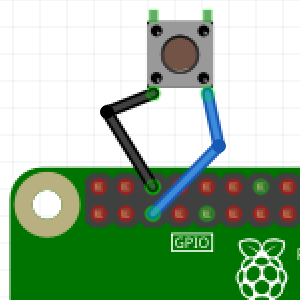
For switching on and off the Raspberry Pi, it is not advisable every time to insert and remove the micro USB power cable, it may damage the connector of the Raspberry Pi. That’s why we’re going to connect a physical button that will turn it Read More …

CategoriesRaspberry PiTagsbutton, off, on, on/off, Pi, Raspberry, Raspbian

Mount a storage device / drive.

Posted on05/12/201724/03/20192 Comments

[Last updated: 03/24/2019] With Linux, to use a storage device, you must mount it. For this tutorial I use a USB stick of 32GB, with a partition formatted in NTFS. 1 : Before connecting the storage device, run the following command : sudo blkid you should Read More …

CategoriesRaspberry PiTagsblkid, driver, fstab, Linux, média, mount, ntfs, ntfs-3g, sda

Create your Access Point with your Raspberry Pi

Posted on05/12/201701/08/20194 Comments

[Last updated: 03/28/19] In this tutorial, we will transform our Raspberry Pi in a Wifi access point, this in order to connect to it and access to the internet using its wired Ethernet connection or to use the applications installed on the Raspberry Pi such Read More …

CategoriesRaspberry PiTagsaccess, Pi, point, Raspberry, Stretch

Actifs Activation afterburner Airdrop Clipboarder automation button Clipboarder Configuration Connection Connexion control Crypto Crypto-actifs Crypto-money Cryptocurrency Door Garage gpu-z Home Homebridge installation IP manager Minage Mining Money Monnaie Movies multimedia média off on Pi plex pool Python Raspberry Raspbian remote RIG server Software séries Wifi Zero

Tags

Actifs Activation afterburner Airdrop Clipboarder automation button Clipboarder Configuration Connection Connexion control Crypto Crypto-actifs Crypto-money Cryptocurrency Door Garage gpu-z Home Homebridge installation IP manager Minage Mining Money Monnaie Movies multimedia média off on Pi plex pool Python Raspberry Raspbian remote RIG server Software séries Wifi Zero

Archives

  • June 2018
  • May 2018
  • April 2018
  • December 2017
  • November 2017
  • October 2017
  • August 2017
  • May 2017
  • April 2017
Copyright © 2026 MForge. All Rights Reserved.
Scroll Up
sponsored